
AI assistants
MCP server
A read-only remote Model Context Protocol (MCP) server over the Properly Platform API. It works with Claude and with ChatGPT.
Hosts connect from inside Claude or ChatGPT; the setup for hosts is on Use Properly in Claude and ChatGPT.
Endpoint
One public URL, the same for every account:
https://platform.getproperly.com/mcpThere is no per-account URL and no credential in the URL. The host identifies themselves by signing in to Properly while authorizing.
Authorization
OAuth 2.1 authorization-code flow with PKCE (S256 required).
-
Discovery per RFC 9728 and RFC 8414, on the same host:
/.well-known/oauth-protected-resource,/.well-known/oauth-protected-resource/mcpand/.well-known/oauth-authorization-server. -
Client registration: both Client ID Metadata Documents and Dynamic Client Registration (
registration_endpoint) are supported. Public clients only, sotoken_endpoint_auth_methodisnone. -
Redirect URIs must be
https. -
The token endpoint accepts
application/x-www-form-urlencoded. -
Include the RFC 8707
resourceparameter, set to the endpoint URL above. Tokens are audience-bound: a token issued for another resource is refused.
Scopes
| Scope | Grants |
|---|---|
properties:read | Unlocks list_properties and get_property. |
bookings:read | Unlocks list_bookings and get_booking. |
jobs:read | Unlocks list_jobs and get_job. |
A refresh token is always issued with the access token. offline_access is accepted
for compatibility but changes nothing.
tools/list returns only the tools the grant covers. Calling a tool outside the
grant returns 403 with WWW-Authenticate: Bearer error="insufficient_scope", scope="<the missing scope>".
Tokens
- Access tokens last one hour.
- Refresh tokens rotate on every use and expire after 30 days unused. Replaying a rotated refresh token is treated as theft and ends the whole connection.
-
A missing, invalid or expired token gets
401withWWW-Authenticate: Bearer resource_metadata="…".
Ending a connection
The host can disconnect in Properly, or the client can call the revocation_endpoint
(RFC 7009). Either ends the whole connection and takes effect immediately: the next request is
refused with 401.
Protocol
- MCP over Streamable HTTP, JSON responses, stateless.
-
Supported protocol versions:
2025-11-25,2025-06-18and2025-03-26. The server answers with the version the client requests when it supports it, and with2025-11-25otherwise. -
Only
POSTis accepted;GETandDELETEreturn405. Batched JSON-RPC requests are rejected.
Clients
Claude
Customize → Connectors → Add custom connector, paste the URL, click Connect and approve in the browser. Every tool is annotated readOnlyHint: true, so Claude groups them as Read-only tools. They
default to Needs approval, and hosts can set them to Always allow.
ChatGPT
Add the URL as a connector. ChatGPT discovers the authorization server and runs the
authorization flow itself, redirecting to an https address.
Tools
Every tool is read-only.
| Tool | Scope | Inputs | Returns |
|---|---|---|---|
list_properties | properties:read |
| Name, id, address, type, bedrooms, beds, bathrooms, bed types, tags, and time zone. |
get_property | properties:read |
| The same fields as list_properties, for one property. |
list_bookings | bookings:read |
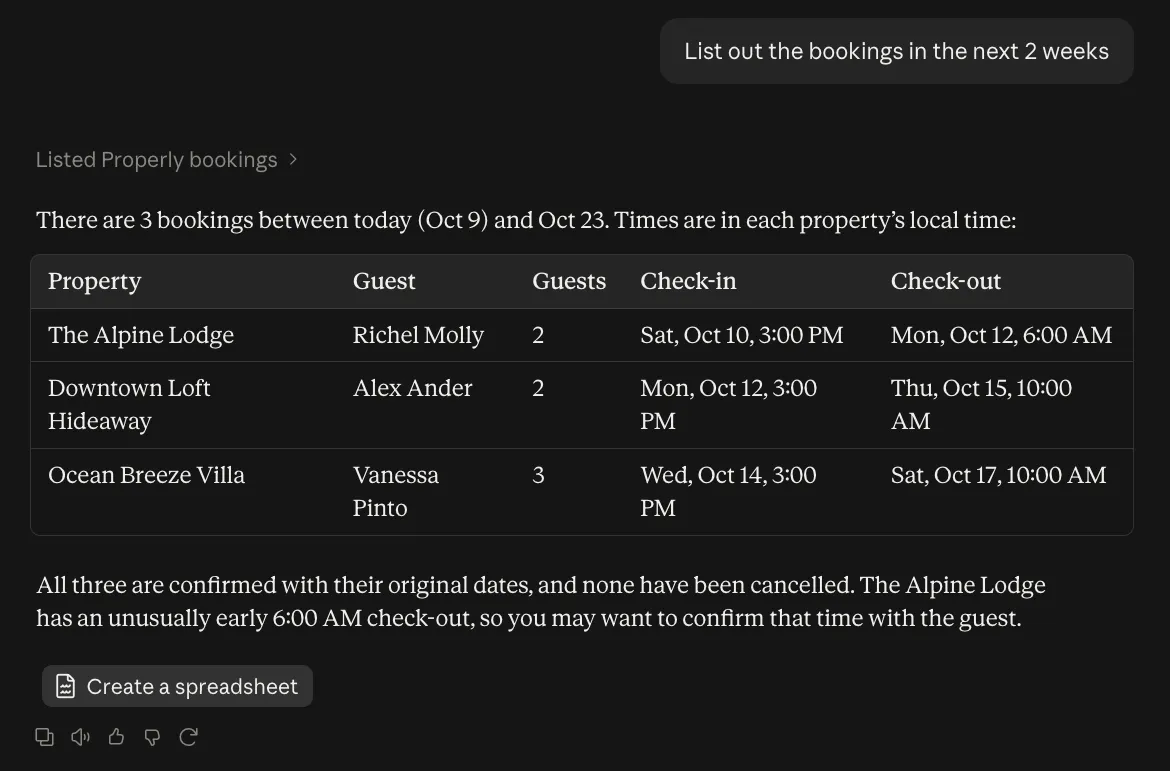
| Property name, check-in, check-out, status, guest names, and number of guests. |
get_booking | bookings:read |
| The same fields as list_bookings, for one booking. |
list_jobs | jobs:read |
| Property name, scheduled start and end, status, assigned cleaner, a verification summary, and jobUrl: a link that opens the job in the Properly web app, absent when the environment has no web URL configured. |
get_job | jobs:read |
| The same fields as list_jobs, including jobUrl, plus actual start and end and the full verification detail, including each reported problem: severity (low, moderate or high), status (open, inProgress, resolved or ignored), the checklist step it was raised against, and when. |
Status words
Jobs: unassigned, accepted, in_progress, finished, cancelled_by_host, cancelled_by_cleaner, declined, pending_changes. The status filter's cancelled matches both cancelled words.
Bookings: initial, changed (the dates were changed) and cancelled.
Dates and times
from and to are calendar days in each property's own time zone. Times
in results are local to the property and carry its UTC offset, for example
2026-09-21T11:00:00+02:00.
Errors
Invalid input, such as a range longer than 31 days, returns a tool result with
isError: true and a plain-language message the assistant can relay. It is not a
protocol error.
Never returned
- Access instructions
- Wi-Fi credentials
- Property and job notes
- The written description and photos attached to a reported problem
- Custom attributes
- Booking titles
- Guest photos
- Cleaner email addresses
- Any coordinates
Limits
-
A call returns at most 200 rows. When more exist, the result includes
truncated: trueand a note asking for a narrower request. - Each connection has its own rate limits, separate from the account's API keys: 100 requests per 2 seconds and 30,000 per day.
-
Over the limit, a tool call returns an
isErrorresult saying when to try again. Other requests get HTTP429with aRetry-Afterheader. -
Access also depends on the account's subscription. If it expires, the connection stays in
place, but every tool call returns an
isErrorresult saying the subscription isn't active. Tools work again as soon as the owner reactivates the subscription; there is no need to reconnect.